This also has ramifications concerning:
Machine listening? Maybe, just....
Also, why not have a go doing this task using Pure Data?
The Task
Using these zipped patches in Max 5+ as a template (if you wish: feel free to recreate your own specialised patch if you wish after studying the template), control one or more parameters of whichever objects you feel appropriate with the outputs of the fiddle~, bonk~ or peakamp~ objects. Common examples would be the speed of an sfplay~ (or groove~), or the frequency of a cycle~.
You should also investigate the 'Noisegate' and 'TapinOut' patches. Noisegate uses the object 'peakamp~' to follow the amplitude of an input and the uses this to create a threshold, eliminating parts of the sound. AudioIn simply allows direct manipulation of delay and feedback. The 'click' patch included uses this idea in a creative way.
NB you are encouraged to adapt your own creative practice in these tasks. If possible use styles and materials with which you are familiar.
For added marks, consider what other sorts of signals you might use as inputs and what other files or other data you might modulate. You might consider the use of computer vision ojects, vocoding and ring modulation.
The results should be interesting and creative (more marks will be awarded for this) - and needn't be too long.
Annotate the patch giving full details of how your patch works.
Please ensure that, in as far as you are able, your patches work immediately they are opened. If your patch or patches use audio files, include short samples that are 'preloaded', (but also include methods for loading user samples, too). Include functioning presets.
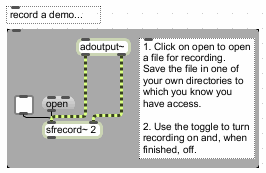
Make a demo recording of your patch working. Please keep the size down to a minimum (maximum duration approximately 10 seconds). Use adoutput~ for the easiest way of doing this:
Additionally or alternatively, mke a screencast of you demonstrating and, if appropriate, performing with your patch. It's easy to do this using Quicktime Player on Mac computers. Choose File/New Screen Recording.
Added value By completing the details of the task you will achieve at least a pass mark. By imaginatively and creatively considering how you might implement the task originally you can add value to your submission, and this added value may increase your mark significantly. Even when making videos of short demonstration tasks try to consider musical and performance criteria.
Compress (zip) your patches, demos, etc. into one file called your_student_number_"fiddle" (e.g. 0504335_fiddle.zip), include a readme with your name and student number and, if necessary, how to use or just open the patch.
Submit a copy of the files to the i-Centre on 2pm Tuesday December 19th 2017
You might also be interested in:
Vocoders and Gates
The Projects
The projects and tasks are designed to help you through the various courses and materials that you'll have to deal with, and also to provide an active and practical element to what could otherwise become a rather dry and technical exercise. Tasks are small exercises - you may be asked to complete one or two per week. Projects are larger and carry a higher percentage of the mark. We will undertake two, three, four or more projects and tasks. The final project is usually an individual choice project, and will be worth significantly more than the others in terms of percentages in your portfolio. We will usually try to set aside a time to perform the projects in a public setting.